
At a glance: How do you calculate staffing requirements for entry?
- Basic formula: Hosts required = Guests per hour / (scans per host / hour)
- Throughput benchmarks:
- Digital QR scan (app/software): approx. 1,000 guests/hr. per host (consistent speed even at large events).
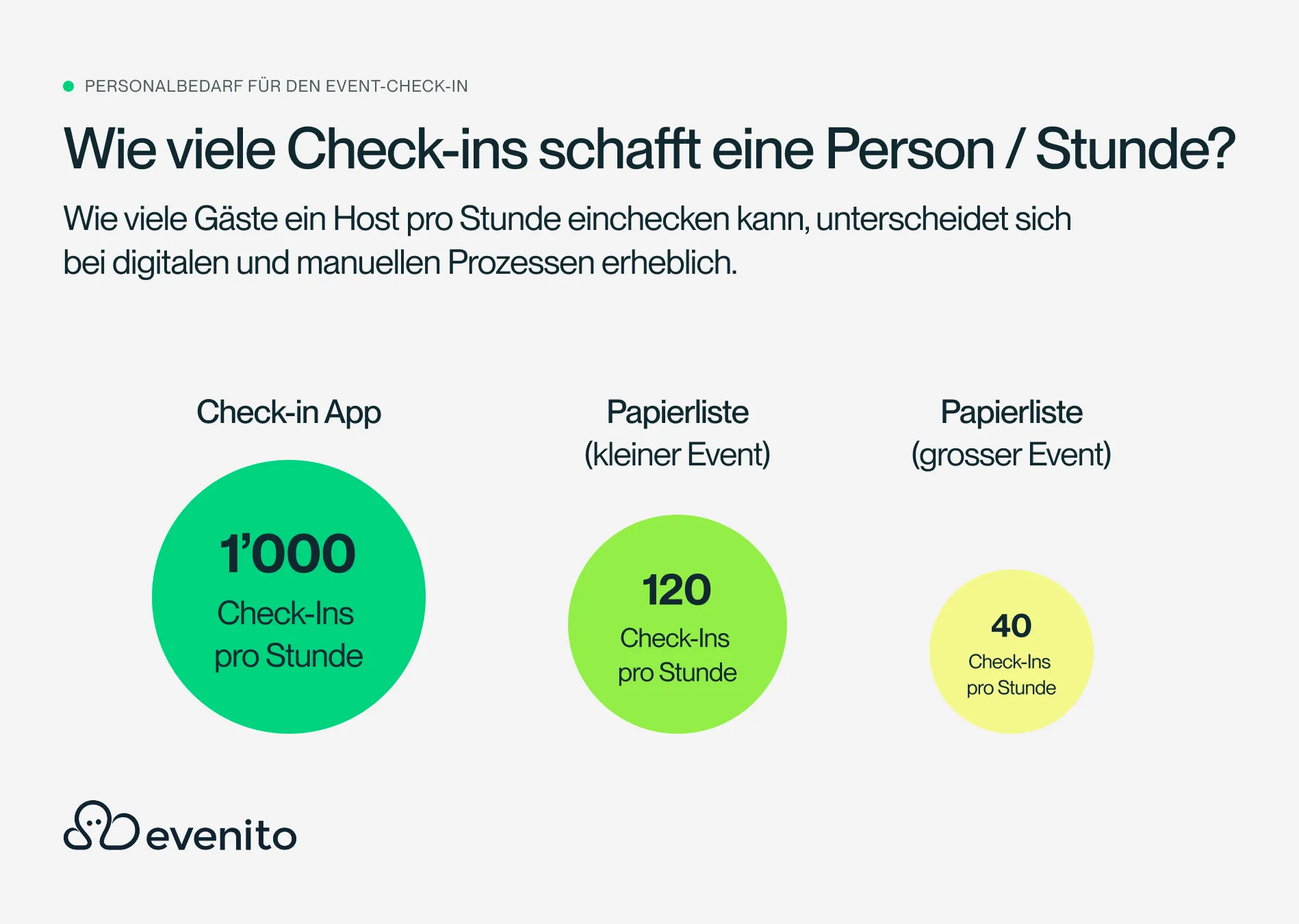
- Paper list (manual): approx. 40–120 guests/hr. per host (speed drops significantly as the guest list grows).
- Recommended additional roles:
- Help desk: From 300 guests plan for 1x separate counter for special cases (ticket issues, walk-ins, name changes).
- Supervisor: From 500 guests Assign 1x admission manager for queue and team management.
- Key insight: It is not the total number of guests that determines staffing requirements, but the maximum arrival rate within the admission time window (peak phase).
Check-in is one of the most important moments of an event. Even before the first presentation begins or the first guest starts talking to other attendees, the first impression is formed at the entrance.
If check-in runs smoothly, the event starts professionally and in a relaxed manner. If, on the other hand, long queues form or delays occur, this has an immediate impact on the entire event experience.
One of the most frequent questions our Customer Success Team receives in this regard is:
"How many hosts and hostesses do I actually need for my event check-in?"
There is no one-size-fits-all answer to this. Staffing requirements depend on far more factors than just the number of guests. Crucial factors include the admission time window, the check-in method used, additional tasks at the reception, and the organization of the entire entrance area.
In this guide, we will show you step-by-step how to calculate the staffing requirements for your event check-in, which mistakes organizers often make, and what is important for professional admission management.
How do you calculate staffing requirements for event check-in?
Staffing requirements can be estimated surprisingly reliably in three simple steps. The rule is: it is not the total number of guests that determines how many staff members you need, but how many people arrive at the same time within a specific period.
Step 1: How many event guests arrive at the entrance per hour?
The most important value for your planning is the throughput, i.e., the number of guests who need to be checked in per hour.
The calculation is simple:
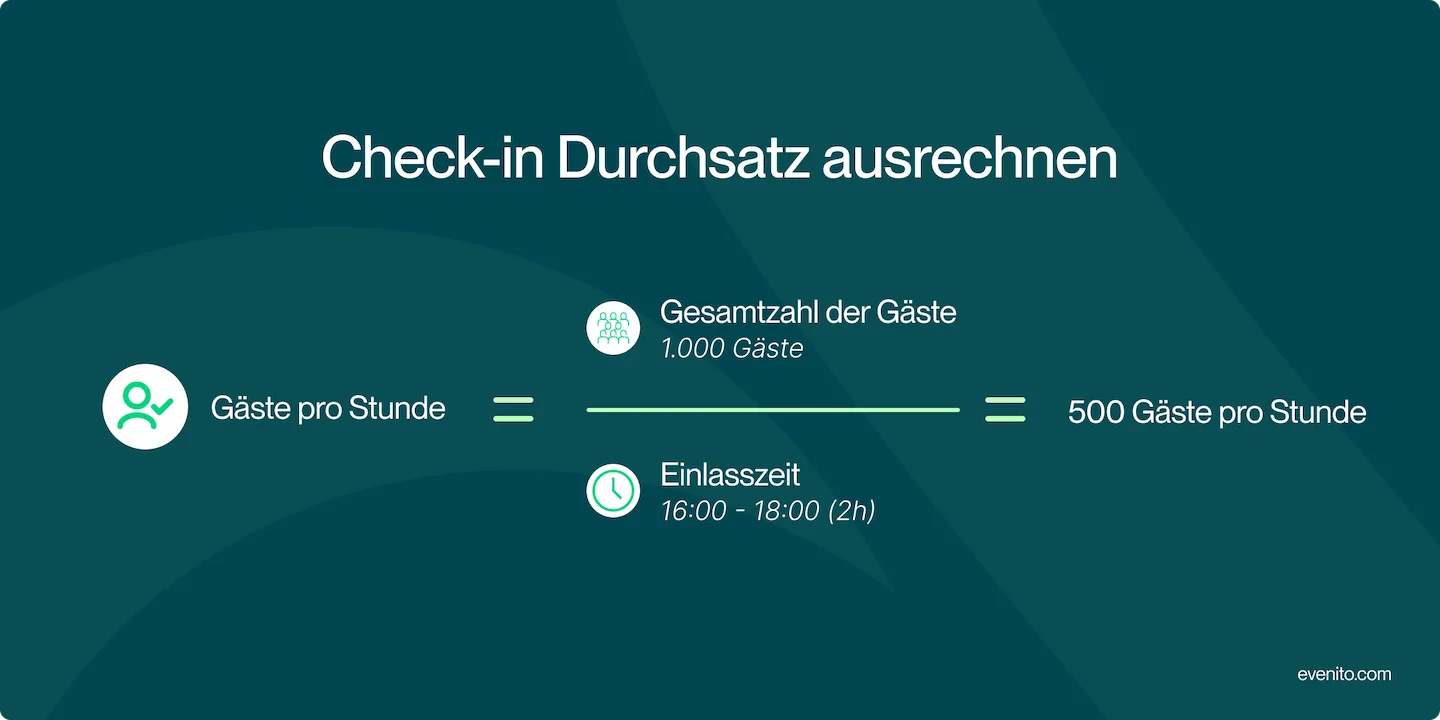
Total number of guests ÷ admission time = guests per hour
Example
An event expects:
- 1,000 guests
- Admission between 5:00 PM and 7:00 PM
The calculation is as follows:
1,000 guests ÷ 2 hours = 500 guests per hour
This figure forms the basis for further staffing plans.
A common mistake is to look only at the total number of attendees. Two events with 1,000 guests each can have completely different staffing requirements:
- If all guests arrive within one hour, 1,000 people must be processed.
- If admission is spread over four hours, the required throughput is reduced to 250 people per hour.
Therefore, it is not the number of guests that determines staffing needs, but the speed at which guests arrive.
A major reason for unforeseen bottlenecks is guests arriving in short peak windows. Industry research from Maritz Global Events shows that up to 22% of attendees arrive or register on-site only in the last 15 minutes before the event begins. Unplanned peak times can only be managed if the planned hourly throughput is calculated with a buffer of at least 15–20%.
Step 2: How many check-ins can one person handle per hour?
The second step is to calculate how many guests a host or hostess can actually check in within one hour. Digital and manual processes differ significantly here.
The actual throughput of a digital check-in depends heavily on the event format, the workflow, and the team's experience. A simple QR code scan can be very fast – events with a straightforward admission process allow for significantly higher throughput than events where additional questions must be answered, badges issued, or attendees searched for.
The following values can serve as a guide:
- 40 guests/hour: Paper list / manual check-in for more complex workflows
- 120 guests/hour: Small event with manual guest list verification
- 300-600 guests/hour: Classic digital check-in with QR code and digital verification
- 600–900 guests/hour: Seminar or business event with additional support and brief conversations at the entrance
- 1,000–1,800 guests/hour: Classic event with simple QR code check-in
- 1,800–2,400 guests/hour: Music festival or large-scale event with high guest volume and fast QR check-in
- 2,400–3,000+ guests/hour: Very large event with an experienced team and extremely fast digital check-in
This means that with a QR check-in solution, depending on the situation, around 1,000 guests per hour and check-in host are possible. However, when planning staff, you should always consider what additional tasks are required at the entrance and when the peak arrival times are expected.
Why is digital check-in significantly faster than paper lists?
A digital check-in operates at nearly the same speed regardless of the event size.
The reason is simple: A guest's QR code is scanned within a few seconds. The software finds the attendee instantly, regardless of whether there are 100 or 20,000 people on the guest list.
With a digital check-in solution like the evenito Scan-Agent App allows one person to check in an average of 1,000 guests per hour.
The benefits:
- an average of less than 4 seconds per scan
- no searching through long lists
- automatic attendance tracking
- real-time overview of all check-ins
- consistent speed even at large events
This allows even several thousand participants to be welcomed efficiently.
The acceleration provided by digital processes is also supported by global surveys: According to the consumer study by Deloitte Digital , over 67% of participants prefer digital QR code solutions at check-in. While manual list verification often takes 1 to 2 minutes per person, digital registration reduces the actual entry time to under 15 seconds per guest, according to benchmark measurements.
Why do paper lists become increasingly slower as event size grows?
Paper lists often work well enough for small events. However, as the number of participants increases, a problem arises that many organizers underestimate. The longer a guest list becomes, the longer it takes to search for individual names.
Additional delays also occur:
- Guests line up at the wrong alphabetical station.
- Names are searched for multiple times.
- Lists must be coordinated between different hosts.
- Last-minute changes are difficult to accommodate.
This significantly reduces the actual capacity per staff member.
While under ideal conditions about 120 check-ins per hour are possible, this figure often drops to just 40 to 60 guests per hour.
The larger the event, the greater the impact of this so-called complexity trap , and more staff does not automatically mean faster entry.
Digital check-in or paper list: which method is more efficient for events?
The differences become particularly clear when comparing both methods directly.
Especially for events with several hundred guests, this difference is quickly noticeable. While digital processes scale almost linearly, the organizational effort for paper lists increases disproportionately.
Why is calculation alone often not enough?
Many organizers only calculate how many people can scan tickets. In practice, however, the entry staff usually takes on significantly more tasks.
The more tasks performed simultaneously at a check-in station, the longer each individual process takes. Therefore, the additional tasks at the reception should be taken into account during staff planning.
What tasks are part of a professional event check-in?
The actual ticket scan is often only a small part of the entire entry process.
Depending on the event, the reception team also handles the following tasks:
- Scan QR codes or tickets
- Search for attendees using the guest list
- Print or issue name badges
- Distribute lanyards
- Hand out goodie bags
- Provide information on the event schedule
- Direct guests to the correct location or session
- Answer questions
- Handle walk-in registrations
- Personally welcome VIP guests
Many of these tasks can be organized separately from one another.
A good example is handing out goodie bags. If this is done directly at check-in, every single entry process is unnecessarily prolonged. If a separate station is set up instead, the actual check-in remains fast and the queue keeps moving continuously.
The same applies to badge printing. For larger events, it is often advisable to prepare name badges in advance or to set up dedicated badge stations.
What technology is needed for a professional event check-in?
In addition to sufficient staff, technical equipment is also a deciding factor for a fast and smooth entry. A modern check-in solution consists of much more than just an app.
Basic equipment generally includes:
Hardware
- Tablets or smartphones for check-in
- QR code scanners (optional)
- Badge printers
- Replacement devices
- Power banks
- Charging cables
- Extension cords
Infrastructure
A stable technical environment is just as important.
This includes:
- reliable Wi-Fi
- mobile backup internet
- sufficient power supply
- a check-in app with offline functionality
The last point in particular is often underestimated.
Even in modern event venues, it can happen that the Wi-Fi drops out or the mobile network becomes overloaded. A professional check-in solution should therefore also work offline and automatically synchronize data as soon as a connection is restored.
This ensures it can be used at any time, regardless of the on-site technical infrastructure.
How do you set up the entrance area for a fast flow of visitors?
A fast check-in depends on more than just having enough staff or the right software. The spatial layout of the entrance area also plays a crucial role.
Even with enough hosts, waiting times will occur if guests don't know where to queue or if multiple processes are taking place at a single desk.
That is why it is worth thinking through the check-in area during the planning phase.
These elements have proven effective in practice:
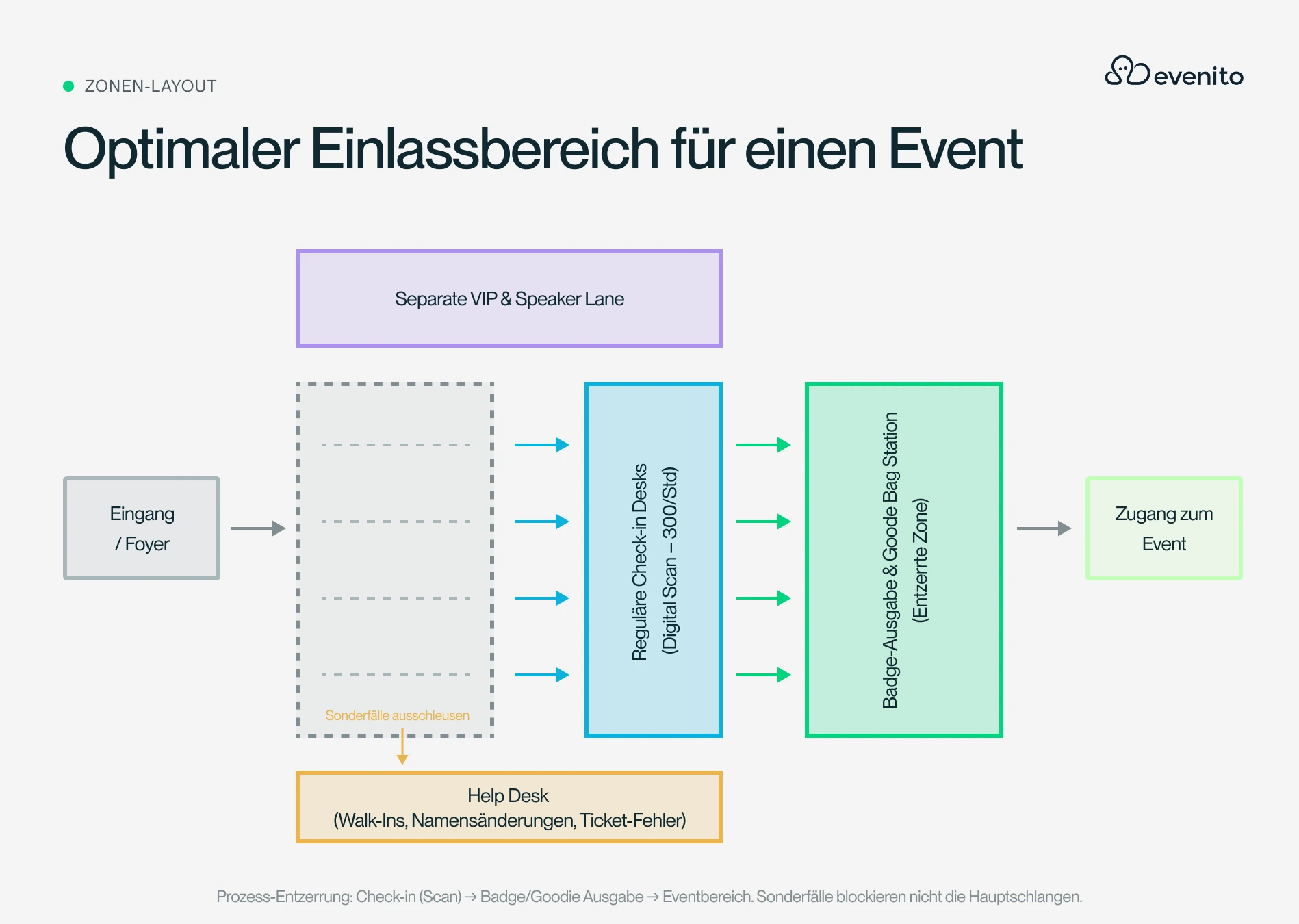
- multiple check-in stations instead of one central queue
- clear signage before the entrance
- sufficient waiting area in front of the check-in desks
- separate areas for special cases
- enough space for badge printing or goodie distribution
The larger the event, the more important good queue management becomes. Stanchions or guidance systems help direct visitor flow and prevent guests from gathering uncontrollably in front of individual stations.
Another tip: Plan enough space between the check-in stations. This allows multiple hosts to work simultaneously without getting in each other's way.
How do you handle VIPs, walk-ins, and last-minute registrations at event check-in?
Almost every event has guests who do not follow the standard process.
These include, for example:
- VIP guests
- Speakers
- Sponsors
- Media representatives
- last-minute registrations
- substitutes
- guests without a QR code
- name changes
Handling these special cases at the regular check-in stations quickly leads to longer wait times for all other attendees. Therefore, separate processes for these guest groups should be planned in advance.
VIP check-in: VIPs often expect a particularly fast and personal welcome.
A separate VIP check-in offers several advantages:
- no waiting times
- personal greeting
- individual support
- discreet reception
Especially for client functions or exclusive events, this contributes significantly to the overall experience.
Walk-ins and spontaneous registrations: Last-minute attendees are a common part of many events. With digital event management software, these guests can be registered directly on-site and added to the attendee list. This saves time and prevents duplicate data entry.
Why should you plan for a help desk for events with around 300 guests or more?
The larger an event becomes, the more frequently special cases arise. That is why we recommend setting up a separate help desk for events with at least 300 attendees. There, staff can handle all inquiries that are not part of the standard check-in process.
Typical tasks include:
- lost tickets
- name changes
- rebookings
- last-minute registrations
- questions about the event
- technical issues
- general information
The advantage: While individual issues are resolved at the help desk, the actual check-in stations remain free and can focus entirely on fast entry. This significantly reduces waiting times for all guests.
When is a supervisor worth having at the entrance?
For smaller events, an experienced check-in team is often sufficient. However, for events with several hundred guests, it is advisable to schedule an additional supervisor. This person does not handle check-ins themselves but instead coordinates the entire entry process.
Their responsibilities include:
- Managing queues
- Providing support with issues
- Coordinating the team
- Communicating with event management
- Making quick decisions during bottlenecks
This allows the hosts to focus entirely on their primary task.
What are the 5 mistakes to avoid when planning event entry staff?
Many bottlenecks at event entrances can be avoided if typical planning errors are identified early on.
These are the 5 most common ones:
- Overestimating or underestimating the number of guests
It is not the total number of participants that is decisive, but the number of guests arriving at the same time. An event with 2,000 participants can be easier to organize than one with 500 guests if the arrivals are spread out over a longer period.
- Forgetting additional tasks
Scanning a ticket often takes only a few seconds. If badges also need to be distributed, goodie bags handed out, or questions answered at the same time, every single check-in takes significantly longer.
- Having no plan for special cases
Every event has guests without tickets, last-minute changes, or walk-ins. If you don't provide a separate help desk for these, you will slow down the entire entry process.
- Not testing the technology
Unstable Wi-Fi, dead tablets, or missing charging cables can significantly delay the check-in process. That is why all technology should be tested before the event begins.
- Underestimating requirements
Even if you can calculate your staffing needs, it is always advisable to plan for a small buffer. If someone drops out at the last minute or more guests arrive at the same time than expected, your team will still be able to handle the situation.

Why is a digital check-in worth it in the long run?
Many organizers initially choose digital check-in solutions to save time. However, the real added value goes far beyond that.
Digital processes enable, among other things:
- faster entry
- lower staffing requirements
- fewer errors
- up-to-date attendee lists in real time
- automatic attendance documentation
- post-event analysis
- better planning for future events
Especially for recurring events, this results in significant long-term time and cost savings.
Conclusion: How do you plan event entry staff sustainably?
The question "How many hosts and hostesses do I need for my event check-in?" cannot be answered with a simple rule of thumb.
The decisive factors are, above all:
- the number of guests per hour
- the check-in method used
- additional tasks at the entrance
- the spatial layout of the check-in area
- handling special cases
- the technical equipment
The more professionally these factors are planned, the smoother the admission process and the more positive the first impression on your guests.
A digital check-in is particularly worthwhile for larger events. It reduces staffing requirements, speeds up admission, and provides a much clearer overview of all attendees.
Calculate staffing requirements in seconds
Calculating the number of admission staff required can quickly become complex depending on the size of the event.
That is why we developed the evenito admission staff calculator .
Based on a few details, you will receive a realistic recommendation within seconds for:
- the number of check-in hosts required
- additional help desk staff
- supervisors
- the total staffing requirements for your event admission
This allows you to plan your resources much more easily and avoid long queues before the event even begins.
Try the evenito admission staff calculator for free now: https://evenito.com/einlasspersonal-rechner
.svg)